
Protect your home.
Protect your values.
Find out more about the new PureFi Home WiFi Solution.
Peace of mind, built into your Wi-Fi
Introducing a next-generation Whole Home WiFi Filter.
PureFi delivers secure and intelligent WiFi filtering, providing fast Internet access with built-in protection included for every device in your home.
PureFi - smart protection for your home.
PureFi Home Internet
Installation & Support

Step 1: Configuration & Setup
Contact us to order your PureFi (Ubiquiti) router and begin setting up your account.
You Choose the Protection Level -> every home is different. You select the filtering level, blocked categories, network separation (Adults / Kids / Guests), and optional time controls (fixed).
We professionally configure your PureFi Router to match your exact specifications before it ever reaches your home.
Step 2: Installation
Connect the PureFi router into your existing modem/router (Bell, Rogers, or any provider) - instructions provided.
Our team then remotely configures your network architecture to ensure:
All outbound and inbound traffic routes through the PureFi router.
Your original router is secured and blocked from accessing.
From this point forward, every device on your network is protected.
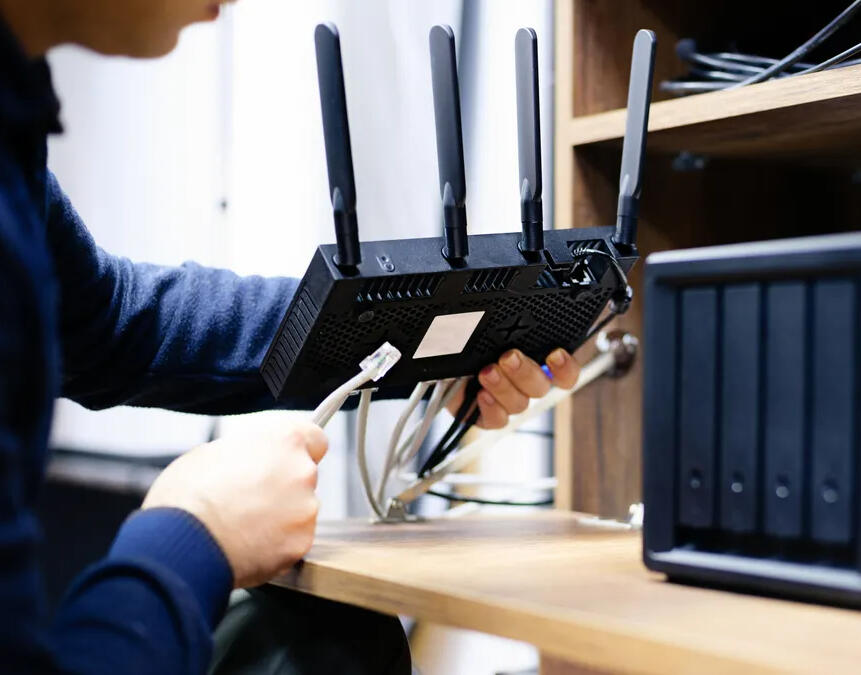

Ongoing Management & Support
PureFi is a fully managed service.
We monitor and maintain your network to ensure filtering stays active and performance remains optimal.
If you need changes, updates, or support, contact us by phone, WhatsApp, or through our website — we take care of the rest.
Get support directly through our ticketing system at
Contact Us
Questions? Check out our FAQ section
Additional Questions? Contact us by WhatsApp
Welcome to PureFi

Our mission is to provide safe, reliable, value-driven Internet that supports and strengthens Torah-centered homes.
PureFi is committed to advancing technology safety solutions.We are a Toronto based organization that promotes, develops and implements innovative solutions that address the unique community challenges posed by today's digital landscape.
PureFi is led by a team of experienced IT and technology industry leaders who are committed to enhancing technology safety solutions through the development and implementation of IT and customer centric frameworks tailored to the needs of the community.
By partnering with industry leaders, technology experts, and community organizations, we strive to create a safer, more responsible digital world for our community.
Why we created PureFi
Holistic home Internet approach is required to support the different tech eco-systems that are common in many households.
Many devices cannot be filtered directly on the device
Gaming and entertainment systems require parental restrictions and Internet filtering.
Join the PureFi Team
The PureFi Team is comprised of tech experts from our community who work or have a background in IT or technology.
Our team help households with install and support of PureFi.
Do you work in technology? Are you techy? Do your friends and family come to you for tech support? Become a PureFi Tech and help families with tech safety solutions.Great opportunity for tech students to build experience!

TAG is best place to start when looking for a filter for your smartphone, tablet or laptop. They offer free install of the best available filters. Visit TAG Website for more details.
Contact Us

PureFi Technology Solutions
Protecting our community from the risks of digital technologies.
Contact us by WhatsApp or Email for additional information.
Website Blocked

The website you attempted to reach is blocked. If this was an error please contact us.
PureFi Home Internet Filter
Protect your home. Protect your values.
Secure. Simple. Fully Managed Home WiFi Internet.
Introducing a next-generation Whole Home WiFi Filter, currently available in Toronto.
Designed to bring a single point of control, unlimited device filtering, and peace of mind for your home.


Built on the Ubiquiti UniFi Platform
PureFi utilizes the UniFi Express 7 with Cleanbrowsing cloud-based Internet filter.
PureFi replaces and manages your home WiFi while enforcing tamper-resistant Internet filtering for every device in your home.
No software to install. No device setup. No ongoing management required.
Fully Managed Service
We install, configure, monitor, and maintain everything. Protects every device on your WiFi network automatically.
Tamper-Resistant Protection
All Internet traffic is forced through secure cleanbrowsing cloud-based filtering that cannot be bypassed.
Cloud-Based Filtering
Blocks inappropriate or harmful content before it reaches your home.
Custom Filtering
Allows you to customize filters based on your family’s needs and values.
Every Devices Filtered
Filtering applies by WiFi network, not by individual device.
Lightning Fast
Operates quietly in the background without slowing your Internet.
Strong WiFi Coverage
High-performance WiFi replaces your router. Mesh WiFi available for larger homes.
Multiple WiFi Networks
Create separate WiFi networks for Parents, Kids, Gaming, Smart Devices, and more—each with its own rules.
Guest WiFi Access
Optional guest WiFi with a secure captive page and password.
Pricing
Initial Setup
$300
One-time setup and equipment fee
Monthly
$30 / month
Ongoing management, monitoring, and support
Get Started
Currently available for Toronto homes.

Frequently Asked Questions
1. What is PureFi?
PureFi is a professionally installed WiFi router that replaces your existing home WiFi system.
It works with all Internet service providers and filters your entire home network at the source — before content reaches your devices.
PureFi is a fully managed service, meaning we handle setup, monitoring, updates, and support remotely.
Key benefits: applies to all WiFi-connected devices (smart TVs, gaming consoles, phones, tablets) without requiring individual software installs per device.
2. Is PureFi a managed service?
Yes.
PureFi is fully managed by the PureFi support team. There is no complicated dashboard or technical setup required from you.
We remotely manage:
Setup and configuration
Filtering adjustments
Troubleshooting
Updates and maintenance
Website review requests
Support is available by phone, email, or WhatsApp.
3. Is there an app?
No.
PureFi does not require an app. Everything is professionally managed by our support team.
If you need changes or assistance, simply contact us and we take care of it for you.
4. Does it work with my existing Internet service?
Yes.
PureFi works withyour existing Internet Service Provider (for example Bell or Rogers in Canada).
5. Why do I need a router filter if my devices are already filtered?
PureFi provides a critical second layer of protection.
Some devices cannot be filtered individually.
Guests may connect unfiltered devices.
Device filters can sometimes be bypassed.
WiFi filtering protects everything connected to your network.
For complete protection, router-level filtering and device-level filtering work best together.
6. What does PureFi block?
You choose exactly what categories you want blocked.After signup, you complete a configuration form outlining your preferences. We then customize your filtering according to your specifications.Filtering is tailored to your home’s needs.
7. Can we have different settings for adults, kids, and guests?
Yes.
PureFi supports three separate WiFi networks, each with independent filtering settings.
For example:
Kids Network (stricter filtering)
Adult Network (customized settings)
Guest Network (separate and controlled)
8. Can I have different rules for different people?
Yes.
Each WiFi network has its own filtering rules and schedules. Devices follow the rules of the network they connect to.
9. What happens when I add a new device?
Nothing special is required. When a device connects to a WiFi network, it automatically inherits that network’s rules.
10. Can the WiFi turn off at certain times?
Yes.
We can set time-based schedules for one or more networks — such as turning off the kids’ network at night.
11. Is Mesh WiFi available?
Yes.
Mesh WiFi can be ordered fro an addiitonal cost to extend coverage in larger homes.
12. What if something important gets blocked?
If a necessary website is blocked, simply contact us.We will review the request and allow the site if appropriate.
13. Can kids bypass the filter using VPNs or DNS changes?
No.All Internet traffic is forced through secure cloud-based filtering. DNS changes and common bypass methods are blocked.
14. Can PureFi replace device filters so I don’t need both?
No.PureFi filters WiFi connections only.Many phones and tablets have mobile data, which can bypass WiFi filtering entirely. Device-level filters are still necessary to protect devices outside the home or when using cellular data.For full protection, both systems are recommended.
15. Are there limitations I should be aware of?
If a device is equipped with mobile (cellular) data or uses a mobile hotspot instead of WiFi, the WiFi filter cannot block that.
16. What is the cost?
One-time setup and equipment fee: $300 CADOngoing management, monitoring, and support: $30 CAD per month
17. How do I get started / where is it available?
The service is currently available through Grow Electronics for Toronto homes.Contact us for installation, setup and support.
Additional Questions? Contact us by WhatsApp
Resources
Xbox Resources
Xbox Training - May 2023
Xbox Training Documents
Donate
Nesher is a community-supported non-profit organization that relies on donations to fund its operations. By donating to Nesher, you can contribute to the cause and receive a charitable receipt for your donation.Join the effort to make a positive impact and donate to Nesher today.